Creating an account at an online casino involves more than simply providing an email address and choosing a password. Customers in Greece must understand eligibility requirements, document standards, verification procedures, and security tools before they begin the registration process. This guide examines each stage of account creation at casino casinoly σύνδεση μέλους, from initial form completion through identity verification, login procedures, and ongoing account protection. Users will get concrete steps, typical timeframes, and troubleshooting advice that can stop common delays or account lockouts. The information below highlights the actual workflow a new user experiences, so every action described can be verified on the official registration and account-management pages.
Knowing Eligibility Requirements Before Registration
Ahead of any personal details are provided, prospective players are required to ensure they fulfill the legal and technical criteria that Casinoly Casino imposes. Greek law sets the minimum age for online gambling participation at eighteen years, and the operator mandates government-issued identification that displays the applicant’s date of birth. In addition, users have to be physically located within Greece or in jurisdictions where the casino’s licence permits play; attempts to register from restricted territories are systematically denied by geolocation filters. A valid email address and a mobile phone number able to receiving SMS codes are required, because both are utilized for identity checks and for two-factor authentication later in the account lifecycle. Finally, applicants must have a payment method—bank card, e-wallet, or local bank transfer—that corresponds to the name on their identification documents, since name mismatches are the most frequent cause of verification failure.
Step-by-Step Account Creation Process
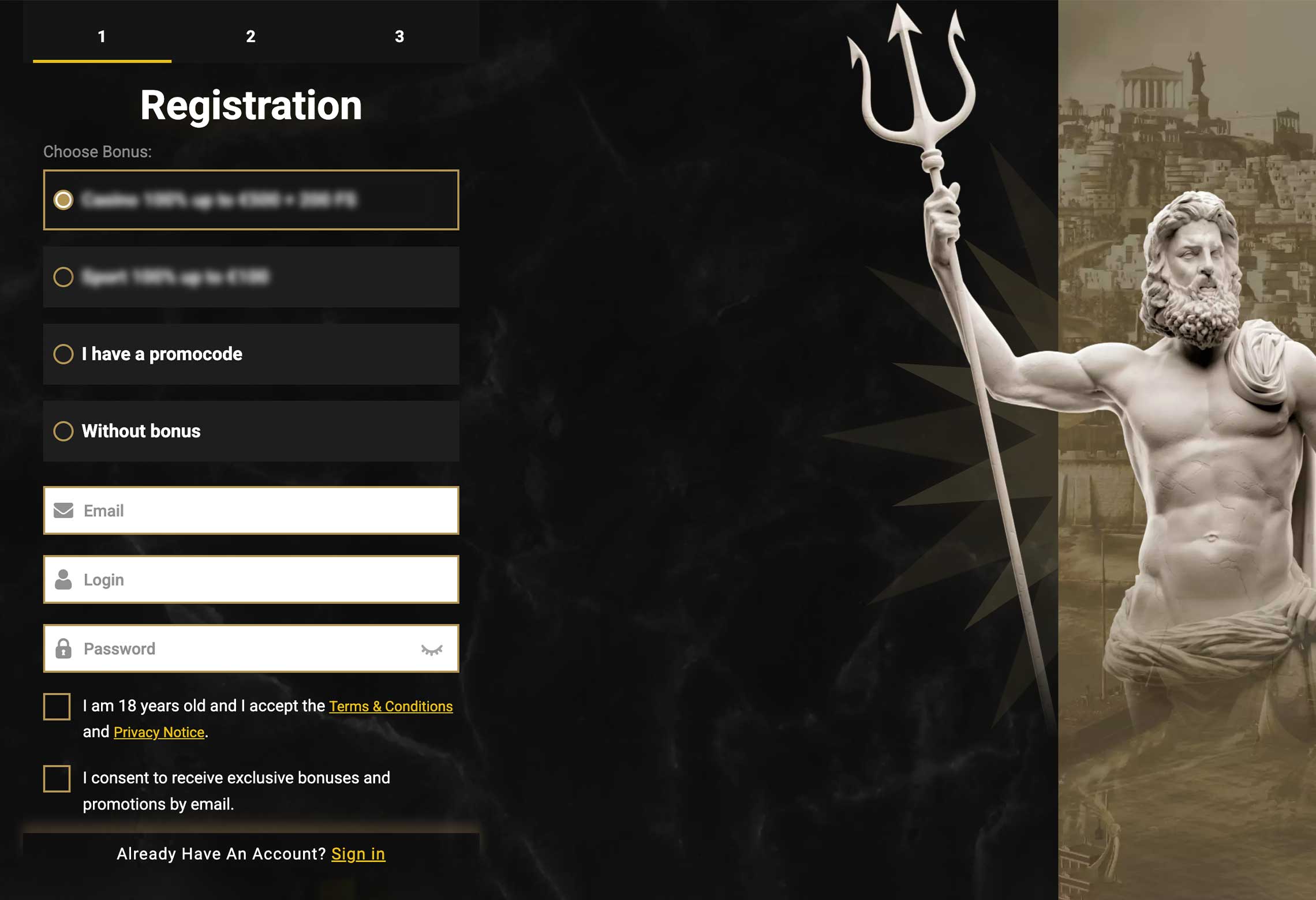
The registration form at Casinoly Casino is displayed as a one-page questionnaire that collects core personal data, contact details, and account credentials. Users commence by choosing their preferred currency from the list offered for Greek residents, which typically features euros. The next fields capture first name, last name, and date of birth precisely as they appear on official documents; any discrepancy, such as an anglicised spelling, should be corrected before submission. A unique username is selected next, followed by a password that must include at least eight characters, with one uppercase letter and one number. The final stage demands entry of an email address and a Greek mobile number, after which a verification link and an SMS code are dispatched. Once both are verified, the account is established but stays in a limited state until identity verification is done.
Choosing the Correct Registration Path
Players can sign up directly on the website or through a mobile browser; the form fields stay identical, yet the mobile version instantly detects screen size and streamlines the layout. A third option is available for users who come via an affiliate link: certain partner sites pre-fill the referring code, which later impacts bonus eligibility. No matter entry point, the system records the device fingerprint and IP address, data that are later verified during the verification stage. If a user initiates registration on one device and tries to verify on another, an additional security prompt may show up asking for confirmation of the new device.
Handling Data Entry Errors
Typographical mistakes in names or birth dates are not editable after the initial submission. The only remedy is to contact customer support, submit supporting identification, and submit a manual correction; such requests are normally processed within one business day. To bypass this delay, players are recommended to type information directly from their passport or identity card rather than relying on memory. Passwords, by contrast, can be changed at any time through the account settings menu, provided the user can still receive two-factor codes on the registered phone number.
Documentation Needs and ID Verification
ID verification, often called KYC, is required under Greek gambling laws and must be completed before deposits go beyond a threshold established by the operator. Casinoly Casino receives colour scans or clear photographs of a national identity card, passport, or driving licence. The document must display the applicant’s full name, a clear photograph, date of birth, and expiry date; temporary paper copies or expired documents are declined. In addition, a recent utility bill or bank statement generated within the last three months is needed to confirm residential address. Both documents must show the identical address that was submitted during registration. Files should be stored in JPEG or PDF format and should not go over five megabytes each, because larger attachments are automatically refused by the upload portal.
Document Upload Workflow
After accessing the newly created account, users proceed to the verification section, where two upload boxes are presented: one for identity and one for proof of address. Once files are chosen, a progress bar shows upload status; users should stay on the page until a green confirmation message is displayed. The compliance team normally checks submissions within twenty-four to forty-eight apnews.com hours, although peak periods such as weekends or public holidays may extend this to seventy-two hours. During review, the account balance is shown but withdrawal functions remain disabled.
Frequent Reasons for Verification Rejection
Rejections most often stem from image quality issues: glare on a laminated card, cropped edges that exclude the document number, or shadows that hide text. Another frequent cause is mismatched information—for example, a registered address that is different from the one printed on the utility bill. When a submission is refused, an email notification lists the specific problem and prompts the user to upload revised files. Applicants are granted three attempts; after the third unsuccessful submission, the account is referred to the compliance department for manual review, which can lengthen processing time by an additional three to five business days.
Safeguards Protecting Player Accounts

Casinoly Casino implements several tiers of protection that surpass 2FA. All pages handling personal or financial data are coded with TLS 1.3, and the site undergoes quarterly penetration testing by an independent security firm. Login sessions end after thirty minutes of inactivity, minimizing the risk of unauthorised access from shared or public computers. In addition, the operator monitors for unusual betting patterns or rapid changes in account details; such events spark automated alerts that may temporarily freeze withdrawals until the account holder confirms the activity via email or phone.
Spotting and Reporting Suspicious Activity
Players should routinely review their login history, available under the security tab of the account menu. Each entry lists date, time, device type, operating system, and approximate location derived from IP address. If an entry shows up from an unfamiliar city or country, users are recommended to change their password immediately and to contact support so that the session can be terminated server-side. The casino also provides a dedicated email address for reporting phishing attempts or suspected social-engineering attacks; reports are received within one hour during business days.
Gadget and Network Recommendations
Although the platform is available from any modern browser, security is maximised when players use official applications downloaded from the Apple App Store or Google Play, because these versions feature certificate pinning that blocks man-in-the-middle attacks. On desktop, the latest stable release of Firefox, Chrome, or Edge is suggested. Public Wi-Fi networks should be avoided for login or financial transactions; if travel demands their use, a reputable virtual private network (VPN) configured for split tunnelling can isolate casino traffic from other devices on the same network.
Signing In and Handling Password Recovery
Once verification is approved, full account functionality—including deposits, gameplay, and withdrawals—is activated. The login page requires the registered email address or username together with the password selected at registration. For security reasons, multiple failed login attempts trigger a temporary lockout that increases in duration with each subsequent failure: five minutes after the third attempt, thirty minutes after the fifth. Unlocking requires either waiting out the timer or contacting live chat with enough identity details to satisfy the support agent.
Password Recovery Procedure
Users who misplace their password click the “Forgot password” link, which prompts input of the registered email address. A time-limited reset link is sent; the link remains valid for two hours. After the new password is set, the system automatically terminates all existing sessions on other devices, requiring a fresh login everywhere. If the user no longer has access to the original email account, support will request a new verification round, including a selfie holding the identity document, before approving a manual password change.
Two-Factor Authentication Setup
Two-factor authentication (2FA) is strongly advised and can be enabled immediately after first login. The system offers authenticator applications that generate six-digit codes; SMS-based 2FA is also accessible but considered less secure. During setup, a QR code is displayed; users scan it with their chosen authenticator app and enter the first generated code to confirm correct configuration. Once active, every login from a new device or browser will request the current 2FA code in addition to the password. Disabling 2FA later demands a support ticket and a fresh identity check, a policy created to prevent unauthorised removal by potential account hijackers.
Funding and Payout Limits Linked to Verification Status
Account verification has a direct impact on the financial limits accessible to each player. Before completing verification, the maximum cumulative deposit is limited to two hundred euros, and withdrawals are not allowed entirely. Upon the first successful KYC review, the deposit ceiling is raised to five thousand euros per month, while withdrawal limits begin at one thousand euros per transaction and ten thousand euros per month. Greater limits can be obtained by submitting additional source-of-funds documentation, such as three months of bank statements or employment contracts; each request is reviewed individually and may need up to five business days for approval.
Payment Method Verification
Some payment providers require their own verification step before handling large withdrawals. For example, when using a credit card, the operator may request a photo of the physical card showing only the last four digits and the cardholder’s name. E-wallets such as Skrill or Neteller usually use the verification already performed by the wallet provider, yet the casino still cross-checks that the wallet account name matches the verified name on file. Any mismatch leads to a request for updated documents rather than an automatic rejection, enabling the player to correct the discrepancy without restarting the entire KYC process.
Processing Times and Fees
Electronic wallet withdrawals are typically processed within twenty-four hours after verification, while bank transfers may require two to five business days depending on the receiving bank’s internal procedures. No fees are applied by Casinoly Casino for withdrawals that fall within the monthly limit; however, the player’s own bank or e-wallet may levy charges, and these are not within the operator’s control. Players are advised to review the fee schedule made available by their chosen payment method before requesting a withdrawal exceeding one thousand euros.
Troubleshooting Frequent Account Issues
Although all steps are followed correctly, users occasionally encounter challenges such as blocked accounts, slowed verification, or repeated deposit failures. The first suggested action is to delete browser cache and cookies, because faulty session data can prevent the verification status from changing. If the problem persists, the live-chat function—offered in English and Greek—provides direct access to support agents who can escalate technical issues to the appropriate department. Before reaching support, users should prepare their account ID, the approximate time of the issue, and any error messages presented, because this information accelerates diagnosis.
Account Blocks and Reactivation
Accounts may be blocked automatically after numerous failed login attempts, after detection of VPN usage from a prohibited jurisdiction, or after a withdrawal request that triggers internal risk rules. Re-enabling requires identity confirmation via a video call or a new set of documents; the exact stipulation is conveyed by email. Players should refrain from creating multiple accounts to circumvent a lockout, because such conduct violates the terms of service and can lead to permanent shutdown of all related accounts and loss of any pending balances.
Identity Document Re-submission
Upon document rejection, the verification portal presents a summary of the problem and a button for uploading new files. Users should address each listed issue separately—for instance, adjusting a passport scan so that all four corners are visible, or ensuring that a utility bill shows the issue date within the last ninety days. If the portal continues to reject files that appear correct, reaching out to support with the file names and the exact rejection message can initiate a manual review that skips automated filters.
Escalation Route for Persistent Problems
When an issue is not resolved after two interactions with standard support, players can request escalation to the compliance or security team by sending an email to a dedicated address published in the terms and conditions. The escalation request should feature a chronological summary of previous communications, ticket numbers, and the desired outcome. Replies to escalated tickets are given within three business days, and the operator guarantees a clear reddit.com explanation of any decision that affects account access or fund availability.